Ask any eSignature vendor “do you integrate with Salesforce?” and the answer is yes. It’s always yes. Which makes the question useless.
The useful question is how — because behind that identical “yes” sit two architecturally different animals, and the difference determines where your contract data lives, what breaks when things change, and how much your Salesforce admin ends up babysitting the integration. This post explains the distinction plainly, including where each approach genuinely wins.
The two architectures
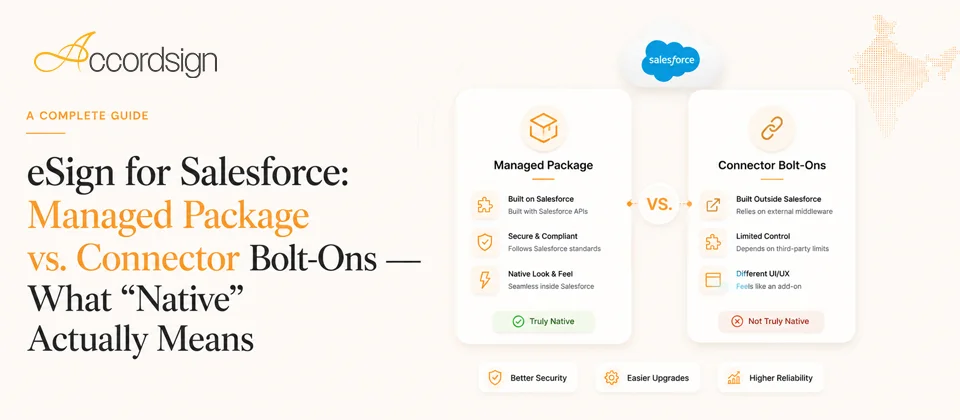
A connector (bolt-on) is a bridge between two separate products. The eSignature platform lives outside Salesforce; the connector shuttles data across — pushing documents out for signature, pulling status back in. The signing workflow, the document store, and the system of record for signature status live on the vendor’s platform. Salesforce gets a window into it.
A managed package is an application installed inside your Salesforce org, distributed and versioned through Salesforce’s own packaging system. The signing workflow runs as part of Salesforce: custom objects hold envelope and recipient status as first-class Salesforce records, the UI is built from Salesforce-native components, and the integration point is inside your org rather than beside it.
Both can legitimately be called “Salesforce integration.” They behave very differently in practice.
Where the difference actually bites
Your data model. With a managed package, envelope and recipient status are Salesforce objects — you can report on them, build list views, trigger flows off them, and relate them to Opportunities and Accounts exactly like any other record. “Show me all agreements awaiting signature for deals closing this month” is a standard report. With a connector, that data’s system of record is the external platform; what’s in Salesforce is a synced copy, as fresh and as complete as the sync allows. Reporting bends around what got mirrored.
Workflow and automation. Native objects mean native automation: a Flow that fires when a recipient signs, a validation rule on envelope state, an approval process that gates sending. Connectors expose events too, but through the sync layer — every automation inherits the sync’s latency and its failure modes.
Where users work. With a package, the sales team sends, tracks, and manages signatures from the record they’re already on. With a connector, some portion of the workflow — template management, document configuration, exception handling — usually lives in the external platform’s own web app, which means a second UI, a second login, and context-switching for whoever manages documents at volume.
Failure modes and maintenance. This is the unglamorous one that admins learn the hard way. A connector is a moving part between two independently-evolving products: API versions change, auth tokens expire, sync queues back up — and diagnosing “why didn’t the status update?” means investigating two systems and the bridge between them. A managed package has fewer moving parts between your data and the signing action, and it’s updated through Salesforce’s own upgrade mechanism, tested against the platform it lives in.
Security and review. Managed packages distributed through Salesforce undergo Salesforce’s security review, and their code runs within the org’s permission model — your admin controls access with the same profiles and permission sets that govern everything else. Connectors are governed primarily by the external platform’s security model, with the OAuth grant as the boundary.
The honest column: where connectors win
This wouldn’t be a useful comparison if one side always won.
- If your team lives outside Salesforce too. A connector’s standalone platform serves the whole company — HR, finance, procurement — not just the CRM users. If Salesforce is one consumer of signatures among many, the external-platform model fits how you actually work. (Worth noting: the best of both is a vendor that offers a full standalone platform and a native package on the same account — you don’t have to choose per-team.)
- If you need a niche capability only one vendor has. Vendor capability beats architecture. If the only platform supporting your specific requirement ships only a connector, take the connector.
- If you’re avoiding managed-package governance. Some orgs — heavily customised, tightly change-controlled — treat every installed package as a governance event. A connector keeps the org untouched. That’s a legitimate preference, with the tradeoffs above as the price.
Questions that expose the architecture behind the “yes”
When evaluating any “Salesforce integration,” ask:
- Where is signature status stored — as objects in my org, or on your platform with a sync?
- Can I build a native Salesforce report on envelope and recipient status without touching your platform?
- Can a Salesforce Flow trigger off a signature event directly?
- When a document is sent from an Opportunity, does the completed, signed file attach back to that record automatically?
- What happens to in-flight envelopes if the connection between systems breaks for a day?
- Is your package listed and security-reviewed through Salesforce, or installed via external OAuth grant?
The answers sort vendors quickly — and reveal which “yes” you were actually being sold.
Where Accordsign sits
Transparency about our own position: Accordsign for Salesforce is a native managed package — envelopes and recipient status live as objects in your org, sending happens from your records, and Aadhaar eSign (including multi-signer) works from inside the CRM. It connects to the same Accordsign account as our web platform, so teams outside Salesforce aren’t second-class. If your evaluation is Salesforce-centric, we think the architecture case above is our strongest one — and the six questions are exactly the ones we’d want you to ask us and everyone else on your shortlist.